
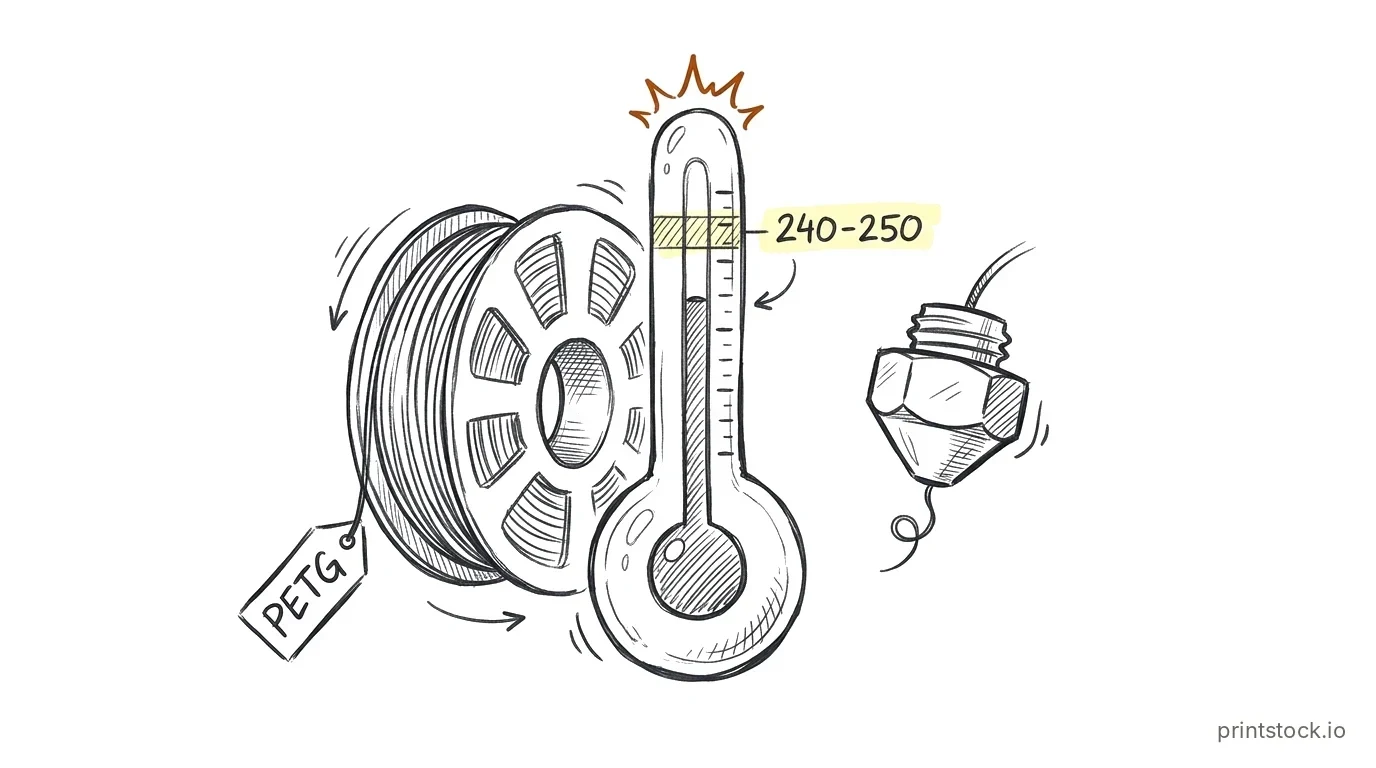
PETG is the filament most people reach for after PLA: tougher, more heat resistant and still easy to print without an enclosure. It also has a reputation for being fussy, mostly because it is printed with PLA habits. This guide collects the settings PETG makers actually publish, shows where they agree and where they do not, and explains what to change when a print goes wrong.
PETG in numbers
PETG prints hotter than PLA and handles more heat. These figures come live from our catalog: every PETG line we track, what its maker publishes, and current in-stock prices.
- Filaments we track
- 16 from 10 brands
- Nozzle, makers' range
- 220-270 °C
- typical middle 245 °C
- Bed, makers' range
- 60-90 °C
- Heat deflection (0.45 MPa)
- 68-78 °C
- median 69 °C, 5 data sheets
- Drying, makers' range
- 55-65 °C
- stated for 11 of 16 lines
- Density
- 1.22-1.3 g/cm³
- Length of 1 kg (1.75 mm)
- 320-340 m
- from makers' density
- Price per kg
- $9.71 to $31.32
- median $14.95, as of Nov 13, 2026
- Colours across these lines
- 259
- up to 36 in one line
- Printers in our catalog it fits
- 88 of 123 FDM printers
PrintStock catalog data for PETG: makers' published values and in-stock US prices, updated with the catalog.
Compared with PLA, the heat deflection figures sit roughly 15 °C higher, which is why PETG is the usual step up for parts that live in a warm room, a car or the sun. Our PLA filament guide has the same figures for PLA.
PETG settings at a glance
For a typical PETG spool on a 0.4 mm nozzle, start with the nozzle at 240 to 250 °C, the bed at 70 to 80 °C and the part cooling fan at 30 to 50 %. Then adjust from the numbers on your own spool.
Setting | Starting point | Notes |
|---|---|---|
Nozzle | 240 to 250 °C | Inside nearly every maker window in our table; go hotter for fast printing |
Bed | 70 to 80 °C | Makers range from 60 to 90 °C; follow your spool |
Part cooling fan | 30 to 50 % | Less than PLA; more only for bridges and overhangs |
Speed (standard PETG) | 30 to 60 mm/s walls | High-speed grades are made to go much faster |
First layer | Slow, nozzle slightly higher than for PLA | PETG dislikes being squashed |
Build plate | Textured PEI, or glue on smooth PEI | Glue works as a release layer |
Drying | About 55 to 65 °C for 5 to 8 hours | Before printing an opened spool |
Enclosure | Not needed | Helps on big parts in a cold room |
If you are switching from PLA, our PLA vs PETG vs ABS guide covers what changes and why.
PETG temperatures by brand
Every PETG maker publishes its own window, and they overlap more than they differ. The table below comes from our catalog: each PETG filament we list, the nozzle and bed range its maker publishes, and the lowest current price per kilogram we have on file.
| Filament | Nozzle (maker) | Bed (maker) | Drying (maker) | Heat deflection | Length per spool | From, per kg |
|---|---|---|---|---|---|---|
| Anycubic PETGAnycubic | 230 to 250 °C | 60 to 70 °C | 55-65 °C, 6-8 h | 69 °C at 0.45 MPa | ≈ 340 m | $9.71as of Nov 11, 2026 |
| Bambu Lab PETG BasicBambu Lab | 240 to 270 °C | 65 to 75 °C | 65 °C, 8 h | 69 °C at 0.45 MPa | ≈ 335 m | $14.95as of Nov 11, 2026 |
| Bambu Lab PETG MatteBambu Lab | 230 to 260 °C | 65 to 75 °C | Not stated | Not stated | ≈ 325 mestimate | $14.95as of Nov 11, 2026 |
| Creality Hyper PETGCreality | 220 to 260 °C | 70 to 80 °C | Not stated | 74.5 °C (load not stated) | ≈ 325 m | $20.56as of Nov 11, 2026 |
| Elegoo PETG ProElegoo | 230 to 260 °C | 75 to 90 °C | 55-65 °C, 8-10 h | Not stated | ≈ 325 mestimate | $10.46as of Nov 11, 2026 |
| Elegoo Rapid PETGElegoo | 230 to 260 °C | 70 to 90 °C | 60 °C, 8 h | Not stated | ≈ 325 mestimate | $10.46as of Nov 11, 2026 |
| eSUN PETGeSUN | 230 to 250 °C | 75 to 90 °C | Not stated | Not stated | ≈ 325 m | $14.95as of Nov 11, 2026 |
| eSUN PETG-MatteeSUN | 240 to 260 °C | 70 °C | Not stated | Not stated | ≈ 325 mestimate | $13.08as of Nov 11, 2026 |
| Overture High Speed PETGOverture 3D | 230 to 260 °C | 65 to 70 °C | 60 °C, 5 h | Not stated | ≈ 665 m | n/a |
| Polymaker PETGPolymaker | 240 to 260 °C | 60 to 70 °C | 55 °C, 6 h | 69 °C at 0.45 MPa | ≈ 320 m | $18.68as of Nov 11, 2026 |
| Polymaker PolyLite PETGPolymaker | 230 to 260 °C | 70 to 80 °C | 65 °C, 6 h | 78 °C at 0.45 MPa | ≈ 1,000 m | $18.69as of Nov 11, 2026 |
| Prusament PETGPrusa Research | 240 to 260 °C | 70 to 90 °C | 55 °C, 6 h | 68 °C at 0.45 MPa | ≈ 325 m | $31.32as of Nov 13, 2026 |
| Spectrum PETGSpectrum Filaments | 230 to 260 °C | 60 to 80 °C | 65 °C, 4 h | 70 °C (load not stated) | ≈ 325 m | $17.75as of Nov 11, 2026 |
| Spectrum PETG Premium High SpeedSpectrum Filaments | 230 to 270 °C | 60 to 80 °C | Not stated | Not stated | ≈ 325 mestimate | $18.68as of Nov 11, 2026 |
| SUNLU PETGSUNLU | 230 to 260 °C | 60 to 70 °C | 60-65 °C, 6-8 h | 70 °C (load not stated) | ≈ 325 m | $13.08as of Nov 11, 2026 |
| SUNLU PETG 2.0SUNLU | 230 to 240 °C | 70 to 80 °C | 65 °C, 6-8 h | 71 °C (load not stated) | ≈ 340 m | $14.01as of Nov 11, 2026 |
Live from our catalog: settings, drying and heat deflection as each maker publishes them (heat deflection is comparable only at the same load); length is calculated by PrintStock. Open a filament for every offer.
The figures come from each maker's data sheet or product page; where the maker's own pages disagree, we use the label data a large retailer publishes for that spool. If a row ever says "See spool label", we could not confirm a figure, and the label on your spool is the best source.
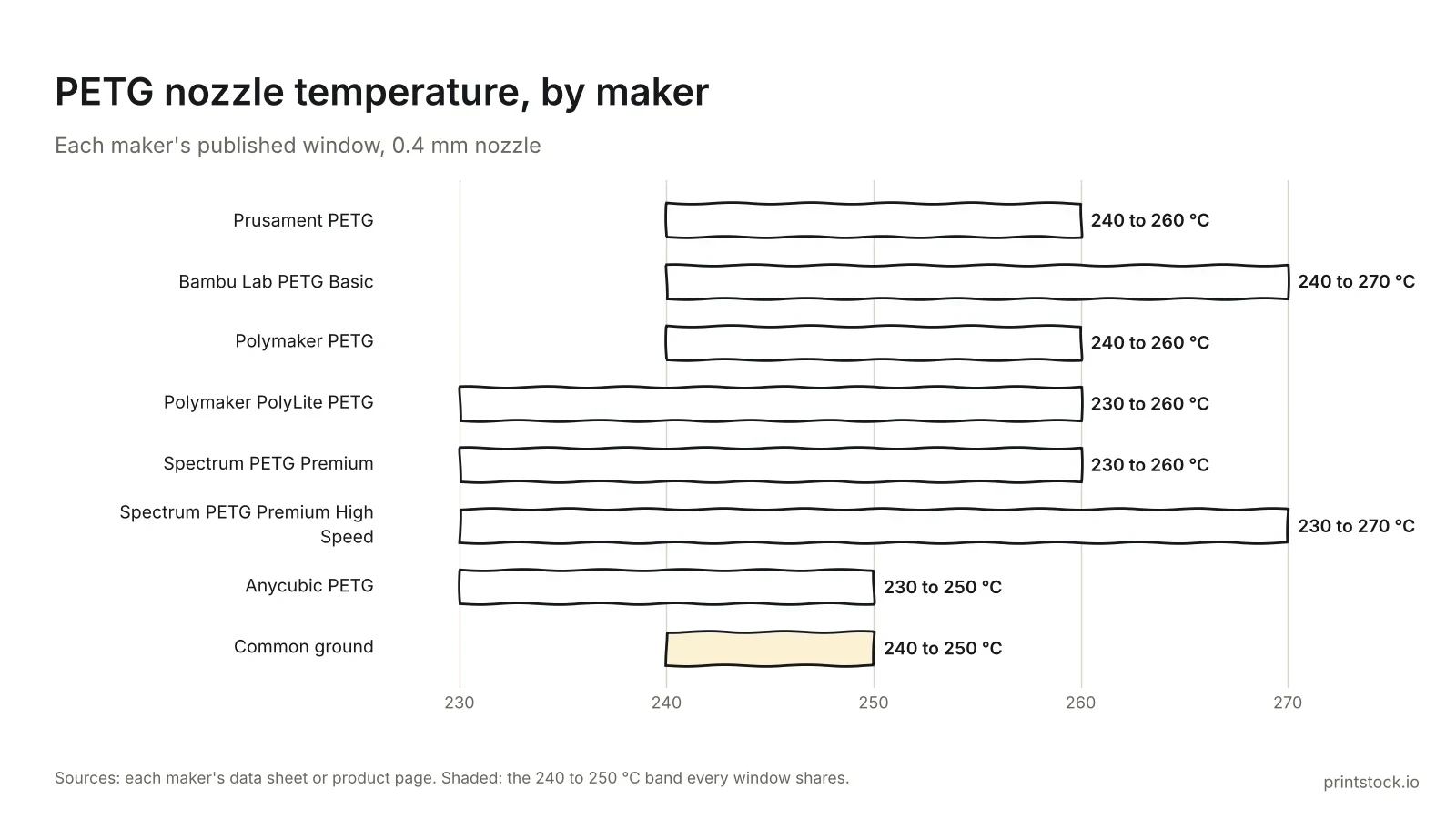
A few things stand out:
- Nearly every nozzle window covers 240 to 250 °C. The exception in our table is SUNLU PETG 2.0, listed at 230 to 240 °C. Prusa lists 250 °C plus or minus 10 for Prusament PETG; Bambu Lab lists 240 to 270 °C for PETG Basic; Polymaker lists 230 to 260 °C for PolyLite PETG; Anycubic lists 230 to 250 °C.
- High-speed grades reach higher. Spectrum's PETG Premium High Speed is rated 230 to 270 °C, against 230 to 260 °C for its standard PETG Premium. Faster printing needs a hotter nozzle to melt plastic quickly enough.
- Bed temperatures differ more. Polymaker's newer PETG asks for only 60 to 70 °C, Anycubic also 60 to 70 °C, while Prusament lists 80 °C plus or minus 10.
These numbers are starting ranges for a 0.4 mm nozzle. A bigger nozzle, a faster print or a cold room all push you toward the top of the window.
Nozzle temperature: finding your number
Start in the middle of your spool's range, then move in 5 °C steps. A temperature tower, a test model that prints each section at a different temperature, finds the best value in one print. Most slicers can generate one.
Signs you are too cold:
- Layers separate or snap apart along a line.
- The surface looks dull and rough instead of glossy.
- The extruder clicks or skips on fast moves.
Signs you are too hot:
- Thin hairs between separate parts of the print.
- Blobs and drips on the surface.
- Sagging on small details and overhangs.
Prusa's PETG guide notes that PETG is prone to stringing, so a few fine hairs even at the right temperature are normal. Our stringing guide walks through the fixes in order.
Bed temperature and build plates
Most PETG needs the bed at 70 to 80 °C, and the surface matters as much as the number. Bambu Lab's filament table gives 60 to 80 °C for PETG on its engineering, high-temperature and textured PEI plates and does not recommend its cool plate for PETG.
PETG has one habit that surprises new users: it can stick too well. On smooth PEI or glass, a hot bed and a squashed first layer, PETG can bond so strongly that it rips pieces out of the surface when you remove the print. The fixes are simple:
- Use a textured PEI plate where you can. The rough surface grips while hot and releases when cool.
- On smooth PEI or glass, apply a thin layer of glue stick. Here the glue works as a separator, not as an adhesive.
- Do not squash the first layer. Set the nozzle slightly higher than you would for PLA.
- Let the bed cool before taking the print off.
If the opposite happens and PETG will not stick, see prints not sticking to the bed and check the bed is clean: fingerprints are enough to spoil the first layer.
Cooling fan
PETG wants less cooling than PLA. Makers' suggestions spread widely: Polymaker gives about 20 % for PolyLite PETG, Prusa about 50 % for Prusament PETG, and Bambu Lab 0 to 60 % for PETG Basic.
- Keep the fan low or off for the first layers so they bond to the bed.
- Run 30 to 50 % for the rest as a starting point.
- Raise it for bridges and steep overhangs, where the plastic needs to set quickly.
- Lower it for strength. Strong cooling chills each layer before the next one fuses to it; functional parts benefit from less fan.
Speed and retraction
Standard PETG prints well at moderate speeds; high-speed PETG is a different product. Polymaker rates PolyLite PETG at 30 to 50 mm/s. Prusa rates Prusament PETG at up to 200 mm/s on its own printers. Grades sold for fast printers go much further: Polymaker's newer PETG up to 300 mm/s, Anycubic's PETG 50 to 250 mm/s and Spectrum's high-speed grade up to 800 mm/s.
Two rules hold for all of them:
- Slow the first layer. It gives PETG time to spread and grip.
- Faster printing needs more heat. If walls look weak or the extruder clicks at speed, raise the nozzle within your maker's window before slowing down.
Retraction (how far the printer pulls filament back before a travel move) depends on the printer more than the filament. Direct drive printers typically use about 0.5 to 2 mm; Bambu Lab lists 0.8 to 1.4 mm for PETG Basic. Bowden printers need several millimetres. Start from your printer maker's PETG profile and change it in small steps.
Drying PETG before printing
PETG absorbs moisture from the air, and wet PETG strings, pops and prints weak parts. If the spool hisses or crackles as it prints, or the surface shows tiny bubbles, dry it before changing any settings.
Makers' drying advice:
- Polymaker PolyLite PETG: 65 °C for 6 hours.
- Anycubic PETG: 55 to 65 °C for 6 to 8 hours.
- Overture PETG: 65 °C for 5 hours.
Store opened spools sealed with desiccant. Our filament drying guide covers dryers, ovens and storage.
Fixing common PETG problems
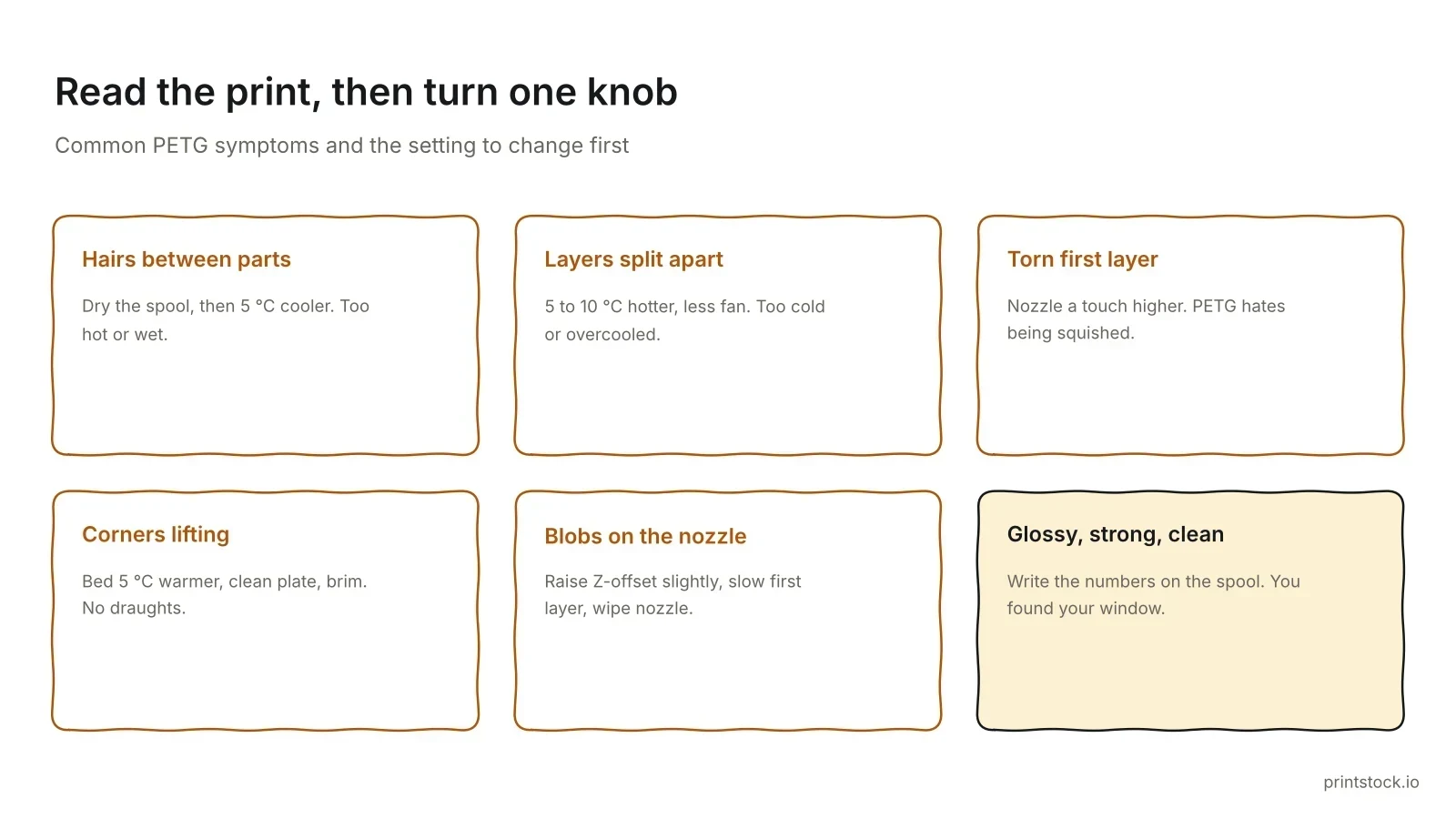
Change one setting at a time and reprint the same test. Most PETG problems trace back to four things: wet filament, the wrong temperature, too much cooling or a first layer that is squashed too hard.
- Stringing and hairs: dry the spool, then lower the nozzle by 5 °C. See 3D printer stringing.
- Weak layers that split: raise the nozzle 5 to 10 °C and lower the fan.
- Rough, torn first layer: raise the nozzle slightly (less squish) and slow the first layer.
- Corners lifting: clean the plate, raise the bed 5 °C, add a brim and keep draughts away. See print warping.
- Plastic building up on the nozzle: this is usually a nozzle set too close to the bed. Raise the Z-offset slightly and wipe the nozzle clean while hot. A silicone sock on the heater block helps keep PETG from collecting there.
PETG-CF and other blends
Carbon fibre and glass fibre filled PETG print at similar temperatures (Bambu Lab lists 240 to 270 °C nozzle and 65 to 75 °C bed for PETG-CF), but the fibres are abrasive. They need a hardened steel nozzle; see our hardened nozzle guide.
Where to go from here
Browse every PETG spool we list, with maker settings and dated prices, on our filaments page. If your PETG strings, start with drying it; if it lifts or warps, see print warping.