Elegoo Neptune 3 Pro
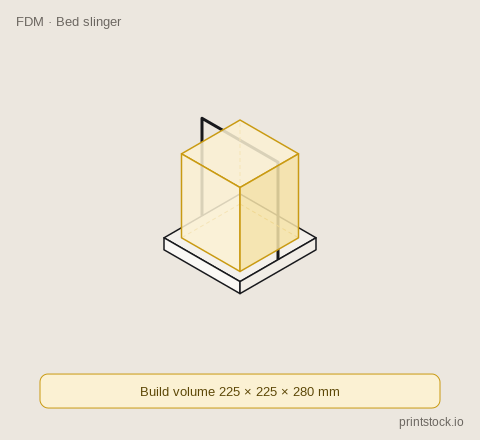
Elegoo's popular 2022 budget printer: 225 × 225 × 280 mm, dual-gear direct-drive extruder, 36-point automatic bed leveling, dual Z lead screws, PEI magnetic plate and a detachable 4.3 in touchscreen. Elegoo stopped firmware updates in July 2023; the Neptune 4 Pro replaced it.
- Most nozzles of the 21 FDM printers under $300 we list
Where to buy
Prices as of Nov 12, 2026Taxes, shipping and any import duties are worked out by the store at checkout and depend on your country; ask the store if in doubt.
Store links may be affiliate links: we may earn a commission, and it does not change your price. Affiliate disclosure
Overview
The Elegoo Neptune 3 Pro, released in 2022, was one of the best-selling budget printers of its generation. It combined a dual-gear direct-drive extruder, 36-point automatic bed leveling and dual Z lead screws on a 225 × 225 × 280 mm bed slinger, at a price that undercut most rivals. Reviewers praised the simple setup and quiet operation.
It prints at typical bed-slinger speeds of 60 to 100 mm/s, so it feels slow next to Klipper machines. Elegoo's Neptune 4 Pro replaced it with Klipper firmware and 500 mm/s. Elegoo's US store still lists the Neptune 3 Pro at a clearance price of $159 alongside pre-owned units, while European shops such as 3DJake no longer sell it.
Owners should know the firmware is effectively finished: Elegoo stopped updating it on July 30, 2023. Printer Hub documents the resulting quirks, including a start G-code that homes before the bed is hot and a saved mesh that is not loaded, both fixable by editing the slicer start code.
Best for
- Budget buyers who find it at a clearance price
- Owners looking for fixes and compatible parts
- Simple PLA, PETG and TPU printing
Look elsewhere if
- You want speed: the Neptune 4 Pro or Bambu Lab A1 is several times faster
- You want ongoing firmware updates
Before you buy
- Firmware updates ended in July 2023; plan to fix quirks in the slicer start G-code.
- Make sure the start G-code heats the bed before homing and loads the saved mesh.
- ABS needs an enclosure.
- Compare the clearance price with a new Neptune 4 Pro or Bambu A1 mini.
Pros and cons
Pros
- Direct drive and auto leveling at a low price
- Dual Z lead screws
- Detachable touchscreen
Cons
- Slow by modern standards
- Firmware no longer updated
- Inductive probe sensitive to bed temperature
What owners like
Box to first print in 30 minutes
Praised by most ownersIt arrives 90% pre-assembled and is easy to use.
Quiet, with direct drive and simple auto leveling
Often praisedReviewers praise quiet operation, the dual-gear direct drive and simple auto bed leveling at a low price.
Collected the same way as known issues: from independent reviews, owner reports and public discussions, merged and grouped.
Known issues
Last reviewed Nov 13, 2026Popular models have longer lists simply because more people own them and talk about them. Severity and status show how much each problem matters today.
Mesh not applied and homing before the bed is hot
Moderate (affects prints)Workaround availableOwners traced first-layer problems to stock start G-code that homes before the bed reaches temperature and never loads the saved mesh, and fixed it by rewriting the start G-code.
Z offset drifts and is lost
Moderate (affects prints)Workaround availableThe probe drifts with bed temperature, and an offset changed mid-print is not saved after a reboot.
Warped bed with no adjustment
Moderate (affects prints)Workaround availableRigid spacers leave no way to level a warped bed; shim or fit springs.
Random reboots wipe settings
Moderate (affects prints)Still reportedThe mainboard resets and loses the Z offset and mesh; rolling back firmware helps some owners.
Firmware abandoned in July 2023
Minor (annoyance)Still reportedElegoo stopped updating the Neptune 3 Pro's Marlin-based firmware on July 30, 2023, so open bugs stay open. Some owners move to Klipper on an external host.
PTFE-lined hotend limits
Minor (annoyance)Still reportedThe liner caps temperature at 260 degrees C and needs frequent replacement under heavy use.
SD card quirks
Minor (annoyance)Workaround availableLong or non-ASCII filenames, macOS hidden files and odd formatting break the file list.
Runout sensor disabled in some firmware
Minor (annoyance)Workaround availableFirmware 1.1.5.1b and 1.1.5.1c compile the runout sensor out.
How we build this list: we collect independent reviews, owner reports and public discussions on forums and social networks, merge duplicates and group them by cause. Only serious or recurring problems make the list, so a single complaint will not appear here, and a listed problem does not mean every unit is affected.
Specs
Printing
- Type
- FDM
- Build volume
- 225 × 225 × 280 mm
- Kinematics
- Bed slinger
- Max speed
- 180 mm/s
- Multi-color
- No
- Nozzles / toolheads
- 1
Extruder and bed
- Extruder
- Direct drive
- Stock nozzle
- 0.4 mm
- Max nozzle temp
- 260 °C
- Filament
- 1.75 mm
- Max bed temp
- 100 °C
- Bed leveling
- Automatic, 36 points
- Enclosure
- No
Control and sensors
- Features
- Power-loss recoveryFilament runout sensorSilent mode
- Screen languages
- EnglishFrenchGermanRussianItalianSpanishJapaneseChinese
Files and setup
- Files the slicer opens
- STL, OBJ, AMF
Extrusion
- Materials
- PLA, PETG, TPU; ABS with an enclosure
Bed
- Build plate
- PEI magnetic spring steel, heated to 100 °C
Motion
- Frame
- Open bed slinger, dual Z lead screws, XY belt tensioners
Features
- Screen
- Detachable 4.3 in touchscreen
- Extras
- LED light, filament sensor, power-loss recovery
Electronics
- Mainboard
- STM32 32-bit, silent drivers (ZNP Robin Nano DW)
From maker and store specifications, checked Nov 12, 2026. Power, size, network and warranty are in their own blocks below.
Power and setup
Network and cloud
- Works without internet
- Yes, fully (SD card / USB / LAN)
- Maker account
- Not needed
- Local control for other software
- None
- Slicers from other makers
- Supported
- Note
- No built-in Wi-Fi or Ethernet; prints from a memory card or over USB. A Raspberry Pi with OctoPrint on the USB port adds network control.
Space and room
- Size (W × D × H)
- 475 × 445 × 515 mm
- Weight
- 8.1 kg
Safety and support
Warranty and repair
- Warranty
- 12 months; main parts; hotend, plates and screens shorter; a longer period applies where local law requires it
- Spare parts store
- Official page ↗
Running costs
| PLA filament, per kg | Cheapest in our catalog: Elegoo PLA Basic | $9.34 |
|---|
Cheapest compatible items in our catalog, USD prices as last checked. Prices change; see each item for the date.
Software and firmware
- Slicer / control software
- ElegooSlicer, Cura, OrcaSlicer, PrusaSlicer
- Firmware
- Elegoo Marlin-based firmware, last updated July 2023
- Connectivity
- microSD, USB
Official firmware and downloads ↗ We never host firmware files.
Questions people ask
Neptune 3 Pro or Neptune 4 Pro?
The Neptune 4 Pro runs Klipper and prints several times faster with a similar bed. Buy the 3 Pro only at a deep discount.
Is the Neptune 3 Pro discontinued?
Elegoo's US store still lists it at a clearance price and sells pre-owned units, but firmware updates ended in July 2023 and the Neptune 4 Pro replaced it.
Does the Neptune 3 Pro have auto leveling?
Yes, 36-point automatic leveling with an inductive probe, plus a manual Z offset.
Models proven to print on the Elegoo Neptune 3 Pro
Coming soonFilaments that fit (66)
Matched by PrintStock from published specs: filament diameter, maximum nozzle and bed temperature and enclosure. Not a print test.
- PETG
- Anycubic PETG, Bambu Lab PETG Basic, Bambu Lab PETG Matte, Creality Hyper PETG, Elegoo PETG Pro, Elegoo Rapid PETG, eSUN PETG, eSUN PETG-Matte, Overture High Speed PETG, Polymaker PETG, Polymaker PolyLite PETG, Prusament PETG, Spectrum PETG, Spectrum PETG Premium High Speed, SUNLU PETG, SUNLU PETG 2.0
- PLA
- Anycubic PLA+, Anycubic PLA Basic, Anycubic PLA High Speed, Anycubic PLA Silk, Bambu Lab PLA Basic, Bambu Lab PLA Matte, Bambu Lab PLA Silk+, Bambu Lab PLA Translucent, Creality Hyper PLA, Creality Hyper PLA RFID, Elegoo PLA, Elegoo PLA Basic, Elegoo PLA Matte, Elegoo PLA Pro, Elegoo PLA Silk, eSUN PLA+, eSUN PLA Basic, eSUN PLA+HS, eSUN PLA-Matte, eSUN PLA-Silk Rainbow, Overture Easy PLA, Overture Matte PLA Dual Colors, Overture PLA+, Overture Silk PLA Gradient, Polymaker Panchroma PLA, Polymaker Panchroma PLA Matte, Polymaker Panchroma PLA Silk, Polymaker PLA Pro, Polymaker PolyLite PLA, Polymaker PolyLite PLA Pro, Polymaker PolyLite Silk PLA, Polymaker PolyMax PLA, Polymaker PolyTerra PLA, Prusament PLA, Spectrum Huracan PLA, Spectrum PLA, Spectrum PLA Pro, Spectrum Premium PLA High Speed, SUNLU High-Speed PLA, SUNLU PLA+ 2.0, SUNLU Silk PLA+ 2.0
Closest alternatives by price
Compare all side by side