$21.58 as of Nov 11, 2026Check price
Bambu Lab
Bambu Lab A1 mini
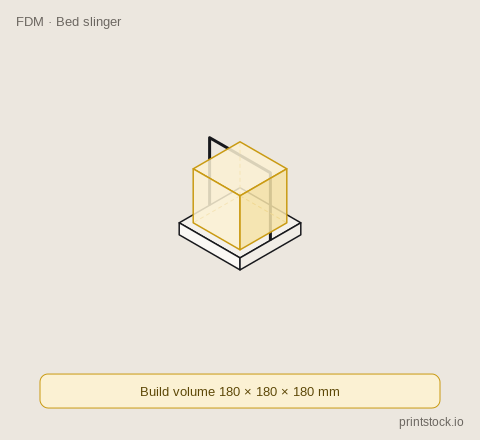
FDMBed slinger180 × 180 × 180 mm
Compact 180 mm bed slinger from Bambu Lab with full auto-calibration and optional 4-color printing with the AMS lite. A small, low-cost first printer for PLA, PETG and TPU.
- Most nozzles of the 21 FDM printers under $300 we list
Where to buy
Prices as of Nov 11, 2026Taxes, shipping and any import duties are worked out by the store at checkout and depend on your country; ask the store if in doubt.
Store links may be affiliate links: we may earn a commission, and it does not change your price. Affiliate disclosure
Price history, 90 days
Lowest: $199 · Highest: $299Overview
The A1 mini is the smallest and cheapest printer in Bambu Lab's range: an open bed slinger with a 180 mm cube build volume and a cantilevered gantry, similar in layout to the Prusa MINI+. Like the full-size A1 it calibrates itself before printing, which is the main reason it is often recommended as a first printer.
The A1 mini Combo adds the AMS lite, a four-spool feeder for multi-color printing. It is the same unit used on the A1 and, like it, keeps spools open to the air.
The limits are size and heat. A 180 mm cube is enough for figures, household parts and most hobby prints, but not for helmets, large cosplay parts or long pieces in one go. The bed reaches only 80 °C, so the A1 mini is a PLA, PETG and TPU machine. If you expect to print bigger parts, the A1 costs about $60 more at our last price check and has a 256 mm cube build volume.
Best for
- A first printer on a tight budget or a small desk
- Kids' projects, toys, figures and household parts in PLA
- Low-cost multi-color printing with the A1 mini Combo
Look elsewhere if
- You want to print anything larger than 18 cm in any direction: the A1 has a 256 mm cube
- You need ABS, ASA, nylon or fiber-filled filaments: the 80 °C bed and open frame are not made for them
- You want a fully open, cloud-free ecosystem: Bambu restricts third-party software (see Software)
Before you buy
- The A1 mini Combo is the printer plus the AMS lite. Buying the AMS lite separately later usually costs more than the Combo difference.
- The AMS lite does not dry or seal filament; store PETG and TPU dry.
- The bed moves front to back, so the printer needs free space in front of and behind it, not just its 347 × 315 mm footprint.
- Check the toolhead screws now and then: loose screws behind the hotend are a known cause of sudden first-layer problems (see Known issues).
Pros and cons
Pros
- Full auto-calibration: bed leveling, flow and vibration compensation
- Small footprint and low power draw (150 W max)
- Tool-free hotend swap and a choice of nozzle sizes
- Four-color printing at a low price with the Combo
Cons
- 180 mm cube build volume limits large prints
- 80 °C bed limits materials to PLA, PETG, TPU and PVA
- AMS lite leaves spools open to moisture
Maker's test data
- Noise
- About 48 dB in Silent mode, measured by Bambu Lab.
- Power draw
- About 6 W idle and 57 W on average while printing.
Published by the manufacturer from its own tests. PrintStock has not verified these figures; owner reports below may confirm or contradict them.
What owners like
Fast, quiet and easy
Praised by most ownersTom's Hardware calls it fast, quiet and easy to use.
Self-calibrating, consistent prints
Praised by most ownersAll3DP praises the self-calibration and highly uniform prints for a beginner-friendly experience.
Cheap entry into multicolor
Often praisedReviewers single out the AMS lite as an affordable way into four-color printing.
Collected the same way as known issues: from independent reviews, owner reports and public discussions, merged and grouped.
Known issues
Last reviewed Nov 13, 2026Popular models have longer lists simply because more people own them and talk about them. Severity and status show how much each problem matters today.
Toolhead screws work loose
Moderate (affects prints)Workaround availableA widely read forum thread and several newer reports describe screws behind the hotend loosening or falling out. Symptoms include a changing Z offset, a bad first layer, extrusion problems or clicking. Owners fixed it by re-tightening the screws, some with thread locker; one A1 owner reported heat damage to the toolhead housing after the hotend assembly sagged.
Heavy purge waste on multicolor prints
Moderate (affects prints)Workaround availableEvery color change purges the nozzle, and reviewers note the AMS lite flings the waste around the printer; lower flushing volumes and printing several copies per plate cut it.
Third-party control limited by authorization firmware
Moderate (affects prints)Workaround availableFrom A-series firmware 01.05.00.00 the printer refuses unofficial software such as OrcaSlicer unless you go through Bambu Connect or switch to LAN-only Developer Mode, which drops cloud features.
Fans louder than the rated 48 dB
Moderate (affects prints)Workaround availableBambu rates the A1 mini at about 48 dB in Silent mode, but the always-on mainboard fan and the part cooling fan are a frequent complaint. Igor'sLab measured 55.3 dB(A) at about 40 cm during printing, and owners of 2025 units report noticeably louder fans than earlier batches, up to the high 60s dB close to the printer. Support has replaced fans for some owners; others lower the part cooling fan limit in the slicer or fit a quieter third-party mainboard fan.
Axis noise and squeaks over time
Minor (annoyance)Workaround availableOwners report a squeaking Y axis and Z lead screw noise after months of use. Bambu's maintenance guidance (lubrication of the rails, lead screw and X idler pulley) usually resolves it.
Toolhead front cover alarm
Minor (annoyance)Workaround availableHMS 0300-1200-0002-0001 reports a missing front cover, sometimes falsely. Weak magnets, a loose PCB screw or poor contact in the 10-pin connector are the usual causes.
Firmware updates stall
Minor (annoyance)Workaround availableUpdates can stop at 25 percent or loop on reboot after skipped versions or a power loss mid-update. Updating step by step or recovering from a microSD card resolves it.
Small build volume
Minor (annoyance)Still reportedThe 180 mm cube is the most common complaint from owners and reviewers.
Bed limited to 80 C
Minor (annoyance)Still reportedThe heated bed tops out at 80 C, so ABS and ASA are not practical without mods.
AMS lite takes a lot of desk space
Minor (annoyance)Still reportedWith the AMS lite on its stand the combo needs much more room than the printer alone.
Already fixed: 2 (show)
Purge wiper leaves filament on the plate
Moderate (affects prints)Fixed in firmwareExcess purge can pile up and stick to the next part when the wiper rails are dirty, the wiper plate is bent or the X-axis cover is misaligned. A late-2023 firmware update improved the wiping logic; cleaning and realignment fix the rest.
Touchscreen flickers or stops responding
Moderate (affects prints)Fixed in a hardware revisionThe display goes black, flickers or registers false touches, usually because its ribbon cable loosened in shipping. Reseating the cable or replacing the screen module fixes it.
How we build this list: we collect independent reviews, owner reports and public discussions on forums and social networks, merge duplicates and group them by cause. Only serious or recurring problems make the list, so a single complaint will not appear here, and a listed problem does not mean every unit is affected.
Specs
Printing
- Type
- FDM
- Build volume
- 180 × 180 × 180 mm
- Kinematics
- Bed slinger
- Max speed
- 500 mm/s
- Max acceleration
- 10,000 mm/s²
- Multi-color
- Yes
- Nozzles / toolheads
- 1
- Materials
- PLA, PETG, TPU, PVA
- Max toolhead speed
- 500 mm/s
- Max hotend flow
- 28 mm³/s (ABS, 280 °C, manufacturer test)
- Filament diameter
- 1.75 mm
- Recommended materials
- PLA, PETG, TPU, PVA
Extruder and bed
- Extruder
- Direct drive
- Stock nozzle
- 0.4 mm
- Nozzle / hotend
- Quick-swap hotend, stainless steel nozzle
- Max nozzle temp
- 300 °C
- Filament
- 1.75 mm
- Max bed temp
- 80 °C
- Bed leveling
- Automatic
- Enclosure
- No
Control and sensors
- Screen
- Touchscreen, 2.4 in
- Features
- Flow calibrationSilent mode
Files and setup
- Files the slicer opens
- STL, OBJ, PLY
- Variants
- A1 mini, A1 mini Combo
Hotend
- Extruder gears
- Hardened steel
Bed
- Max bed temperature
- 80 °C
- Build plate
- Textured PEI included; Smooth PEI optional
Features
- Sensors
- Filament run-out, tangle detection, filament odometry, power loss recovery
- Camera
- Low-rate, up to 1080p, timelapse
Physical
- Frame
- Steel and extruded aluminum, open cantilever frame
- Max power draw
- 150 W
Connectivity
- Interfaces
- Wi-Fi, Bambu-Bus, microSD card
From maker and store specifications, checked Nov 12, 2026. Power, size, network and warranty are in their own blocks below.
Power and setup
Electricity
- Mains input
- 100 to 240 V (universal)
- Rated power
- 150 W
- Average while printing
- 80 W
- Idle
- 7 W
Network and cloud
- Works without internet
- Yes, fully (SD card / USB / LAN)
- Maker account
- Only for cloud / remote features
- Local control for other software
- Limited or behind a special mode
- Slicers from other makers
- Supported
- Built-in camera
- Yes
- Note
- Full control from third-party software needs LAN-only mode with Developer Mode (firmware since 2025)
Space and room
- Size (W × D × H)
- 347 × 315 × 365 mm
- Weight
- 5.5 kg
On a standard power circuit
- US 15 A / 120 V standard circuit: fine, and about 1,250 W stays free for other things on that circuit while it heats up
- EU/UK 16 A / 230 V standard circuit: fine, and about 2,750 W stays free for other things on that circuit while it heats up
- A 10-hour run (for example, several figures printed one after another): about 0.8 kWh. Multiply by your price per kWh for the cost.
Our calculation from the maker's rated power and average power while printing, keeping a circuit at 80% for long loads.
Safety and support
Safety
- Noise (maker figure)
- 48 dB, under 48 dB (maker)
- Safety and conformity marks
- CE (EU), UKCA (UK), FCC (US radio)
Computer you need
- Runs on
- Windows, macOS (Apple silicon)
Warranty and repair
- Warranty
- 24 months; for consumers in the EU, Switzerland, Norway, Iceland, the US and Canada (US and Canada extended from 12 months in 2026); receipts only from Bambu Lab or authorized resellers
- Spare parts store
- Official page ↗
- Repair guides
- Official page ↗
- Open source
- No
Running costs
| PLA filament, per kg | Cheapest in our catalog: Elegoo PLA Basic | $9.34 |
|---|---|---|
| Spare nozzle or hotend | Bambu Hotend - A1/A2 | $9.99 |
| Spare build plate | Bambu 3D Effect Plate | $11.99 |
Starter budget: about $218 for the printer at its best listed price, 1 kg of PLA and a spare nozzle.
Cheapest compatible items in our catalog, USD prices as last checked. Prices change; see each item for the date.
Software and firmware
- Slicer / control software
- Bambu Studio (official); OrcaSlicer, PrusaSlicer and Cura via exported G-code or Bambu Connect
- Firmware
- Closed source; Authorization Control since A-series firmware 01.05.00.00, with an optional LAN-only Developer Mode
- Connectivity
- Wi-Fi, Bambu Handy app and cloud, LAN mode, microSD card
Official firmware and downloads ↗ We never host firmware files.
Questions people ask
Bambu Lab A1 or A1 mini?
Same features and auto-calibration; the difference is size and bed temperature. The A1 prints a 256 mm cube and its bed reaches 100 °C, the A1 mini prints a 180 mm cube with an 80 °C bed. At our last check the A1 cost $259 and the A1 mini $199 at the Bambu Lab US store.
What does the A1 mini Combo include?
The A1 mini plus the AMS lite, a four-spool feeder for printing up to four colors in one part. The Combo was listed at $299 at our last check.
Can the Bambu Lab A1 mini print PETG?
Yes. Bambu lists PLA, PETG, TPU and PVA as the materials for the A1 mini. ABS and ASA are not a good fit because the bed reaches only 80 °C and the frame is open.
Which nozzle sizes fit the A1 mini?
It ships with a 0.4 mm stainless steel nozzle; 0.2, 0.6 and 0.8 mm hotends are available and swap without tools.
Models proven to print on the Bambu Lab A1 mini
Coming soonFilaments that fit (64)
Matched by PrintStock from published specs: filament diameter, the materials Bambu Lab lists for this printer. Not a print test.
- PETG
- Anycubic PETG, Bambu Lab PETG Basic, Bambu Lab PETG Matte, Creality Hyper PETG, Elegoo PETG Pro, Elegoo Rapid PETG, eSUN PETG, eSUN PETG-Matte, Overture High Speed PETG, Polymaker PETG, Polymaker PolyLite PETG, Prusament PETG, Spectrum PETG, Spectrum PETG Premium High Speed, SUNLU PETG, SUNLU PETG 2.0
- PLA
- Anycubic PLA+, Anycubic PLA Basic, Anycubic PLA High Speed, Anycubic PLA Silk, Bambu Lab PLA Basic, Bambu Lab PLA Matte, Bambu Lab PLA Silk+, Bambu Lab PLA Translucent, Creality Hyper PLA, Creality Hyper PLA RFID, Elegoo PLA, Elegoo PLA Basic, Elegoo PLA Matte, Elegoo PLA Pro, Elegoo PLA Silk, eSUN PLA+, eSUN PLA Basic, eSUN PLA+HS, eSUN PLA-Matte, eSUN PLA-Silk Rainbow, Overture Easy PLA, Overture Matte PLA Dual Colors, Overture PLA+, Overture Silk PLA Gradient, Polymaker Panchroma PLA, Polymaker Panchroma PLA Matte, Polymaker Panchroma PLA Silk, Polymaker PLA Pro, Polymaker PolyLite PLA, Polymaker PolyLite PLA Pro, Polymaker PolyLite Silk PLA, Polymaker PolyMax PLA, Polymaker PolyTerra PLA, Prusament PLA, Spectrum Huracan PLA, Spectrum PLA, Spectrum PLA Pro, Spectrum Premium PLA High Speed, SUNLU High-Speed PLA, SUNLU PLA+ 2.0, SUNLU Silk PLA+ 2.0
Compatible accessories
Everything that fits the Bambu Lab A1 mini
$9.99 as of Nov 11, 2026Check price
$11.99 as of Nov 11, 2026Check price
$17.49 as of Nov 11, 2026Check price
$21.99 as of Nov 11, 2026Check price
$15.99 as of Nov 11, 2026Check price
Closest alternatives by price
Compare all side by side