$104.99 as of Nov 11, 2026Check price
Prusa Research
Prusa XL+
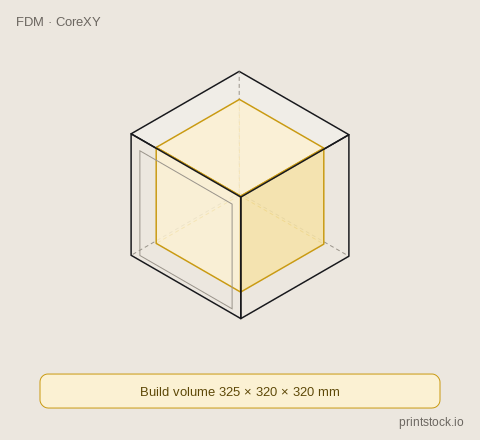
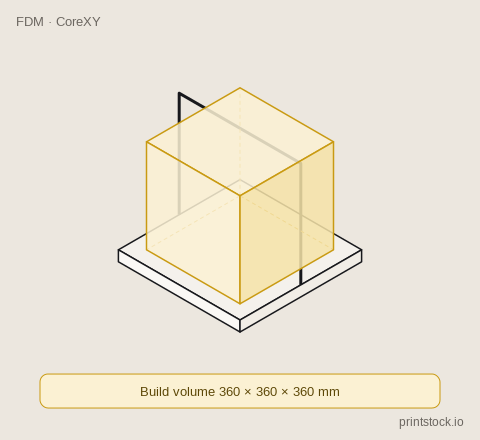
FDMCoreXY360 × 360 × 360 mm
Prusa's large-format toolchanger: 360 mm cube build volume, up to five independent toolheads for true multi-material prints with almost no purge waste, open-source firmware. Sold with one, two or five tools.
Where to buy
Prices as of Nov 11, 2026Taxes, shipping and any import duties are worked out by the store at checkout and depend on your country; ask the store if in doubt.
Store links may be affiliate links: we may earn a commission, and it does not change your price. Affiliate disclosure
Price history, 90 days
Lowest: $2,149.34 · Highest: $2,299Overview
The XL+ is the second generation of the Prusa XL, Prusa's large CoreXY printer and toolchanger. Its 360 mm cube build volume (46.7 liters) is far larger than most desktop printers, and the five-tool version can print five materials in one job: each tool has its own nozzle, so switching from rigid to flexible or soluble filament needs almost no purge.
Compared with the original XL, the XL+ prints about 10 to 15% faster, uses finer 1.5 mm pitch belts, adds a nozzle wiper and replaces mechanical tool-offset calibration with an electronic sensor. It keeps Prusa's openness: open-source firmware, any filament brand, offline operation and parts designed to be serviced with a screwdriver.
It is open-frame by default with an optional enclosure, and it is expensive. At our last check the Prusa store listed the single-tool XL+ assembled at $2,299; the multi-tool versions cost much more. Owners of multi-tool XLs have reported firmware releases that caused tool crashes and calibration problems (see Known issues).
Best for
- Very large single prints up to 36 cm in every direction
- True multi-material prints: rigid plus flexible plus soluble supports
- Labs, studios and workshops that value open-source firmware and repairability
Look elsewhere if
- Your prints fit in a 256 mm cube: smaller printers cost a fraction of the price
- You want an enclosed, heated printer out of the box
- You want multi-color on a budget: the Snapmaker U1 or Bambu H2C cost less
Before you buy
- Start with one tool and add more later; the frame is ready for up to five.
- Plan for a footprint of about 70 × 90 cm and 30 kg.
- Multi-tool owners often wait before installing new firmware; check the forum for the current release.
- Lead times for assembled units can run several weeks.
Pros and cons
Pros
- Huge 360 mm cube build volume
- Up to five independent toolheads with little purge waste
- Open-source firmware, offline use, any filament
- Repairable with long spare-parts support
Cons
- Very expensive, especially with five tools
- Open frame unless you buy the enclosure
- Some firmware releases caused tool-change problems
What owners like
Multi-material without waste
Praised by most ownersReviewers praise toolchanging that avoids purge waste and the mess of other multi-material systems.
Terrific versatility
Often praisedAll3DP says its versatility outweighs its rough edges.
Collected the same way as known issues: from independent reviews, owner reports and public discussions, merged and grouped.
Known issues
Last reviewed Nov 13, 2026Popular models have longer lists simply because more people own them and talk about them. Severity and status show how much each problem matters today.
Tool crashes and parking collisions after firmware updates
Moderate (affects prints)Still reportedMulti-tool owners report toolheads colliding during parking or calibration after firmware 6.4.0 and later, with some rolling back to 6.2.6. Several bugs are tracked on Prusa's GitHub; other owners run new firmware without problems.
Owners ask for a reliability roadmap
Moderate (affects prints)Still reportedXL owners petitioned Prusa over toolchanger reliability, belt path stability and motion hardware, and asked for an upgrade path for early units.
Development lags behind the Core One
Moderate (affects prints)Still reportedThe XL got firmware updates later than other models and still lacks the 360 degree nozzle cooling and integrated camera of the Core One.
Dock and tool-offset calibration failures
Minor (annoyance)Workaround availableNew owners report a tool failing to be grabbed during offset calibration or a dock that will not calibrate. Prusa's help article for error 17104 notes that vibration from a nearby printer can make tool-offset calibration fail.
Expensive enclosure
Minor (annoyance)Still reportedThe enclosure costs more than some complete multicolor printers and feels like patchwork.
Bulky and expensive
Minor (annoyance)Still reportedReviewers list the size and price as the main downsides, plus brass nozzles as standard.
How we build this list: we collect independent reviews, owner reports and public discussions on forums and social networks, merge duplicates and group them by cause. Only serious or recurring problems make the list, so a single complaint will not appear here, and a listed problem does not mean every unit is affected.
Specs
Printing
- Type
- FDM
- Build volume
- 360 × 360 × 360 mm
- Kinematics
- CoreXY
- Multi-color
- Yes
- Nozzles / toolheads
- 5
- Materials
- PLA, PETG, TPU, ABS, ASA, PC, PA, PVA
- Filament
- 1.75 mm, any brand
Extruder and bed
- Extruder
- Direct drive
- Stock nozzle
- 0.4 mm
- Max nozzle temp
- 290 °C
- Filament
- 1.75 mm
- Build plate
- Segmented bed (16 zones) with removable magnetic sheets
- Max bed temp
- 120 °C
- Bed leveling
- Automatic
- Enclosure
- No
Control and sensors
- Screen
- Touchscreen, 3.5 in
- Features
- Input shapingFlow calibrationNozzle wiper or cleanerPower-loss recovery
Files and setup
- Files the slicer opens
- G-code
- Arrives
- Ships assembled
Toolheads
- Toolheads
- 1 to 5 independent Nextruder toolheads, automatic tool changing
- Calibration
- Load-cell first layer; electronic tool-offset sensor
- Upgrades over XL
- About 10 to 15% faster, 1.5 mm GT belts, nozzle wiper, better toolhead and electronics cooling
Physical
- Power use
- About 80 W printing PLA, 120 W ABS
Connectivity
- Interfaces
- Ethernet, optional Wi-Fi, USB; offline capable
From maker and store specifications, checked Nov 12, 2026. Power, size, network and warranty are in their own blocks below.
Power and setup
Electricity
- Average while printing
- 80 W
Network and cloud
- Works without internet
- Yes, fully (SD card / USB / LAN)
- Maker account
- Only for cloud / remote features
- Local control for other software
- Open (documented or open source)
- Note
- PrusaLink web interface and API on the local network; Prusa Connect cloud is optional
Space and room
- Size (W × D × H)
- 700 × 720 × 900 mm
- Weight
- 27.9 kg
Safety and support
Safety
- Safety and conformity marks
- CE (EU)
Warranty and repair
- Warranty
- 12 months; optional +1 or +2 year extension for MK4S, +1 year for MINI+; printers bought from third parties: one year from delivery
- Repair guides
- Official page ↗
- Open source
- Firmware
Running costs
| PLA filament, per kg | Cheapest in our catalog: Elegoo PLA Basic | $9.34 |
|---|---|---|
| Spare build plate | XL Textured Powder-coated Print Sheet | $67.99 |
Starter budget: about $2,159 for the printer at its best listed price, 1 kg of PLA.
Cheapest compatible items in our catalog, USD prices as last checked. Prices change; see each item for the date.
Software and firmware
- Slicer / control software
- PrusaSlicer (official); OrcaSlicer and other G-code slicers
- Firmware
- Open source (Prusa Firmware Buddy)
- Connectivity
- Ethernet, optional Wi-Fi, USB, Prusa Connect, offline mode
Official firmware and downloads ↗ We never host firmware files.
Questions people ask
How much does the Prusa XL+ cost?
At our last check the Prusa store listed the single-tool XL+ assembled at $2,299. Two-tool and five-tool versions cost considerably more, and the enclosure is extra.
What changed from the Prusa XL to the XL+?
About 10 to 15% faster printing, 1.5 mm GT belts, a nozzle wiper, better toolhead and electronics cooling, and automatic tool-offset calibration with an electronic sensor.
Prusa XL+ or Snapmaker U1?
Both are toolchangers. The XL+ has a much larger 360 mm build volume, up to five tools and open-source firmware, at a much higher price. The U1 has four tools, a 270 mm build volume and costs a fraction of the XL+.
Can I upgrade a single-tool XL+ to more tools?
Yes. The frame is built for up to five tools, and Prusa sells toolhead upgrade kits.
Models proven to print on the Prusa XL+
Coming soonFilaments that fit (80)
Matched by PrintStock from published specs: filament diameter, the materials Prusa Research lists for this printer. Not a print test.
- PETG
- Anycubic PETG, Bambu Lab PETG Basic, Bambu Lab PETG Matte, Creality Hyper PETG, Elegoo PETG Pro, Elegoo Rapid PETG, eSUN PETG, eSUN PETG-Matte, Overture High Speed PETG, Polymaker PETG, Polymaker PolyLite PETG, Prusament PETG, Spectrum PETG, Spectrum PETG Premium High Speed, SUNLU PETG, SUNLU PETG 2.0
- PLA
- Anycubic PLA+, Anycubic PLA Basic, Anycubic PLA High Speed, Anycubic PLA Silk, Bambu Lab PLA Basic, Bambu Lab PLA Matte, Bambu Lab PLA Silk+, Bambu Lab PLA Translucent, Creality Hyper PLA, Creality Hyper PLA RFID, Elegoo PLA, Elegoo PLA Basic, Elegoo PLA Matte, Elegoo PLA Pro, Elegoo PLA Silk, eSUN PLA+, eSUN PLA Basic, eSUN PLA+HS, eSUN PLA-Matte, eSUN PLA-Silk Rainbow, Overture Easy PLA, Overture Matte PLA Dual Colors, Overture PLA+, Overture Silk PLA Gradient, Polymaker Panchroma PLA, Polymaker Panchroma PLA Matte, Polymaker Panchroma PLA Silk, Polymaker PLA Pro, Polymaker PolyLite PLA, Polymaker PolyLite PLA Pro, Polymaker PolyLite Silk PLA, Polymaker PolyMax PLA, Polymaker PolyTerra PLA, Prusament PLA, Spectrum Huracan PLA, Spectrum PLA, Spectrum PLA Pro, Spectrum Premium PLA High Speed, SUNLU High-Speed PLA, SUNLU PLA+ 2.0, SUNLU Silk PLA+ 2.0
- ABS
- Bambu Lab ABS, Creality Hyper ABS, Elegoo ABS, Polymaker PolyLite ABS, Siraya Tech Fibreheart ABS HT HF, SUNLU ABS
Compatible accessories
Everything that fits the Prusa XL+
$104.99 as of Nov 11, 2026Check price
$70.99 as of Nov 11, 2026Check price
$67.99 as of Nov 11, 2026Check price
$70.99 as of Nov 11, 2026Check price
$679 as of Nov 11, 2026Check price
Closest alternatives by price
Compare all side by side