$129 as of Nov 11, 2026Check price
xTool
xTool S1
LaserEnclosed
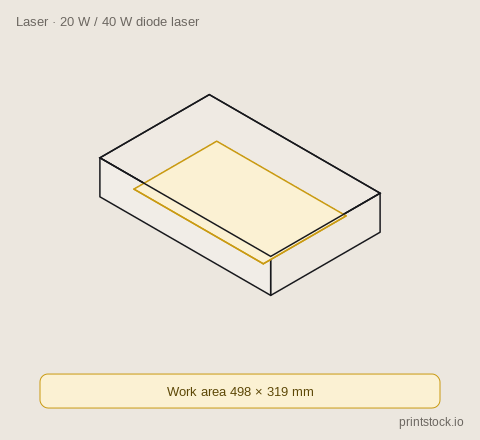
Enclosed Class 1 diode laser cutter from xTool with 20 W or 40 W modules, a 498 × 319 mm working area, 600 mm/s and pass-through for long pieces. No safety goggles needed with the lid closed.
Where to buy
Prices as of Nov 11, 2026Taxes, shipping and any import duties are worked out by the store at checkout and depend on your country; ask the store if in doubt.
Store links may be affiliate links: we may earn a commission, and it does not change your price. Affiliate disclosure
Overview
The xTool S1 was the first enclosed 40 W diode laser with a Class 1 safety rating, which means that with the lid closed the beam stays inside the machine and nobody in the room needs laser goggles. That makes it a common pick for home workshops, classrooms and small businesses that cannot set aside a separate laser room.
It takes interchangeable modules: a 40 W diode for cutting wood and opaque acrylic, 20 W and 10 W diodes for finer engraving, and a 2 W infrared module for marking metal and plastics. The working area is 498 × 319 mm with the 40 W module, larger than A3, and a pass-through slot and the optional conveyor feeder handle pieces up to three meters long. Reviewers cut about 20 mm of pine in one pass at 40 W.
Diode lasers do not cut clear acrylic and cut more slowly than CO2 machines like the xTool P2S or Glowforge Pro. At our last check xTool listed the S1 40 W Basic bundle at $1,448. You need to vent smoke outside, as with any laser cutter.
Best for
- Home and classroom laser work where Class 1 enclosed safety matters
- Cutting wood, MDF, leather and opaque acrylic up to about 20 mm
- Long signs and panels using pass-through or the conveyor feeder
Look elsewhere if
- You need to cut clear acrylic: diode lasers cannot; look at a CO2 laser
- You mostly mark metal: a fiber or MOPA laser such as the xTool F2 Ultra is better suited
- You need a camera for photo-based positioning of material
Before you buy
- You need ventilation: route the exhaust hose outside or use a smoke purifier.
- Air assist is essential for clean cuts; check which bundle includes it.
- Metal marking needs the optional 2 W infrared module.
- LightBurn is supported but owners report occasional compatibility problems after LightBurn updates.
Pros and cons
Pros
- Class 1 enclosed: no goggles needed with the lid closed
- Swappable 40 W, 20 W, 10 W and infrared modules
- Large working area and pass-through for long pieces
- Autofocus and curved-surface engraving
Cons
- Diode laser cannot cut clear acrylic
- No camera for material positioning
- Heavy for a desktop machine (20 kg)
What owners like
Enclosed and easy to assemble
Praised by most ownersTom's Hardware lists easy assembly, a full enclosure, positioning crosshairs and a large cutting area as reasons to buy.
High resolution engraving with friendly software
Often praisedTechRadar praises engraving and cutting quality and user-friendly software, suited to crafters, model makers and classrooms.
Quick setup for beginners
Often praisedReviewers found setup simple, about 20 screws in six steps, and the software easy to use.
Collected the same way as known issues: from independent reviews, owner reports and public discussions, merged and grouped.
Known issues
Last reviewed Nov 13, 2026Popular models have longer lists simply because more people own them and talk about them. Severity and status show how much each problem matters today.
Module falls off the rails or moves unevenly
Moderate (affects prints)Workaround availablexTool documents the S1 laser module coming off its rails or not moving smoothly on the X axis, with step-by-step fixes and replacement parts if needed.
Support follow-through complaints
Moderate (affects prints)Still reportedSome owners report repeated faults and slow support tickets; one owner had problems from the first month.
Laser module seated incorrectly
Minor (annoyance)Workaround availablexTool's support site lists several faults caused by a module that is not fully fixed in place, such as the red cross shifting during framing. Re-seating the module and checking the fixing structure fixes it.
Position limit failures and LightBurn connection problems
Minor (annoyance)Workaround availableSome owners get "Position Limit Failure" errors, solved by testing and replacing the limit sensors, and others report alarms when using newer LightBurn versions.
Wi-Fi setup is hard
Minor (annoyance)Workaround availableReviewers had trouble setting up Wi-Fi at first.
Riser base confuses the distance sensor
Minor (annoyance)Workaround availableWith the riser base, the distance sensor can misread thin materials.
No camera and costly extras
Minor (annoyance)Still reportedThere is no positioning camera, and air assist and other extras cost more.
How we build this list: we collect independent reviews, owner reports and public discussions on forums and social networks, merge duplicates and group them by cause. Only serious or recurring problems make the list, so a single complaint will not appear here, and a listed problem does not mean every unit is affected.
Specs
Printing
- Type
- Laser
- Max speed
- 600 mm/s
- Laser
- 20 W / 40 W diode laser
- Laser type
- Diode
- Laser output
- 40 W
- Cuts through
- WoodPlywoodLeatherPaper and cardboardFabric and feltCorkFoamMDFBambooAcrylicdark or opaqueRubber
- Engraves or marks
- WoodPlywoodMDFBambooLeatherPaper and cardboardFabric and feltCorkRubberAcrylicdark or opaqueStone and slateAnodized aluminiumPainted or coated metal
Hardware
- Enclosure
- Yes
Files and setup
- Files the software opens
- SVG, DXF, JPG, PNG, BMP
- Variants
- 10W, 20W, 40W
Laser
- Laser modules
- 40 W or 20 W diode; 10 W diode and 2 W 1064 nm infrared modules optional
- Spot size
- 0.08 × 0.10 mm (40 W); 0.08 × 0.06 mm (20 W)
- Safety class
- Class 1 (IEC/EN 60825) with the lid closed
Work area
- Working area
- 498 × 319 mm (40 W); 498 × 330 mm (20 W)
- Bed size
- 608 × 385 mm
- Long pieces
- Up to 470 × 3000 mm with the Automatic Conveyor Feeder and extra rail
- Max object height
- 42 mm; 125 mm with the Class 1 riser base
Motion
- Working speed
- 600 mm/s
Features
- Focus
- One-click autofocus and dynamic focus for curved surfaces
- Safety
- Flame detection, lid-open stop, emergency stop
- Positioning
- Pin-point positioning (no camera)
Software
- File types
- SVG, DXF, JPG, PNG, BMP, TIF
Connectivity
- Interfaces
- Wi-Fi, USB
From maker and store specifications, checked Nov 12, 2026. Power, size, network and warranty are in their own blocks below.
Power and setup
Network and cloud
- Software from other makers
- Supported
- Note
- Runs from xTool Creative Space; LightBurn supports basic jobs (native device type since LightBurn 1.7 over USB) but not curved materials or the module position features.
Space and room
- Size (W × D × H)
- 765 × 561 × 183 mm
- Weight
- 20 kg
Safety and support
Safety
- Laser class
- Class 1 laser product
- Laser safety features
- Flame detection, Lid or door interlock, Emergency stop button
Warranty and repair
- Warranty
- 12 months; 12 months on main parts; CO2 laser tube 6 months, mirrors and lenses 3 months; xToolCare extends cover to 24 or 36 months
- Spare parts store
- Official page ↗
- Repair guides
- Official page ↗
Software and firmware
- Slicer / control software
- xTool Creative Space (XCS, official), LightBurn
- Firmware
- xTool firmware, updated through XCS
- Connectivity
- Wi-Fi, USB; XCS on Windows, macOS, iPad, Android and iOS
Official firmware and downloads ↗ We never host firmware files.
Questions people ask
Do you need safety glasses with the xTool S1?
Not with the lid closed. The S1 is Class 1 certified, so the beam is fully contained. Opening the lid stops the laser.
xTool S1 20W or 40W?
The 40 W module cuts thicker material faster, about 20 mm of pine in one pass. The 20 W has a finer spot for detailed engraving. Modules are interchangeable, so you can add the other later.
Can the xTool S1 cut acrylic?
It cuts opaque and dark acrylic. Like all diode lasers it cannot cut clear or light-colored acrylic; that needs a CO2 laser.
Can the xTool S1 engrave metal?
It can mark coated metals with the diode modules, and engraves bare metal and plastics with the optional 2 W infrared module.
Compatible accessories
Everything that fits the xTool S1
$199 as of Nov 11, 2026Check price
$169 as of Nov 11, 2026Check price
$169 as of Nov 11, 2026Check price
$599 as of Nov 11, 2026Check price
$1,099 as of Nov 11, 2026Check price
Closest alternatives by price
Compare all side by side