$39 as of Nov 11, 2026Check price
xTool
xTool M2
LaserEnclosed
Enclosed Class 1 craft laser that cuts, engraves and prints in color: 10 W or 20 W diode laser, optional CMYK inkjet module for print-then-cut, 426 × 320 mm laser area and two cameras.
Where to buy
Prices as of Nov 11, 2026Taxes, shipping and any import duties are worked out by the store at checkout and depend on your country; ask the store if in doubt.
Store links may be affiliate links: we may earn a commission, and it does not change your price. Affiliate disclosure
Price history, 90 days
Lowest: $499 · Highest: $899Overview
The xTool M2 is a craft machine more than a pure laser cutter. It combines a 10 W or 20 W diode laser for cutting and engraving with an optional CMYK inkjet module, so it can print a full-color design onto paper, card or wood and then cut around it. A 3 W infrared module adds metal and plastic engraving.
It replaces the M1 Ultra but drops that model's blade and pen tools, which brought the price down: xTool launched the 10 W standalone at $549 to $599, with bundles up to about $1,339. At our last check xTool listed it at $499 for the 10 W and $899 for the 20 W standalone. Like the S1 it is fully enclosed and Class 1, so no goggles are needed with the lid closed.
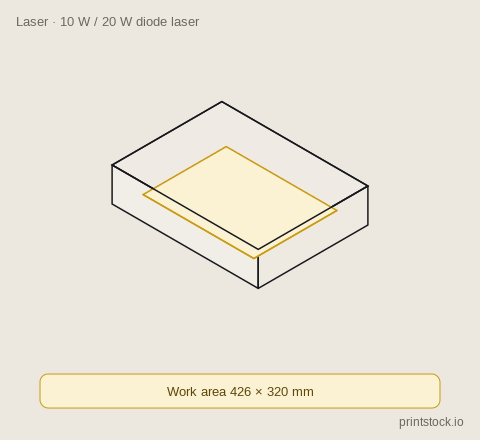
The laser area is 426 × 320 mm, slightly smaller than the S1, and the inkjet prints a 300 × 294 mm area. It is not a UV printer: ink works on absorbent materials, not glossy plastics. The inkjet module is new and most support articles cover cartridge and nozzle maintenance (see Known issues).
Best for
- Paper crafts, stickers, cards and gifts with print-then-cut
- Hobbyists who want laser engraving and cutting in a safe enclosed machine
- Classrooms and family workshops
Look elsewhere if
- You need to cut thick wood quickly: the 40 W xTool S1 or a CO2 laser is faster
- You expect to print on glossy plastic or metal: the inkjet needs absorbent surfaces
- You want blade cutting for vinyl or fabric: the M2 dropped the M1 Ultra's blade
Before you buy
- The inkjet module and the 3 W infrared module are optional add-ons; check what the bundle includes.
- Ink cartridges are consumables (40 mL); check the cost per cartridge before printing large areas.
- Clean the inkjet nozzles if the machine sits unused; xTool recommends a nozzle check before printing.
- Vent the exhaust outside or use an air purifier, as with any laser.
Pros and cons
Pros
- Laser cutting, engraving and color printing in one machine
- Class 1 enclosed with two cameras for positioning
- Low entry price for the 10 W version
- Modules swap quickly
Cons
- Slower cutting than 40 W diode or CO2 lasers
- Inkjet only suits absorbent materials
- No blade or pen tools
What owners like
Strong engraving from the 10W module
Praised by most ownersTechRadar found engraving exceptionally good even with the 10W module and setup straightforward.
Seamless print then cut
Often praisedCrafters praise how well it prints in color and then cuts the same piece without a riser base.
Collected the same way as known issues: from independent reviews, owner reports and public discussions, merged and grouped.
Known issues
Last reviewed Nov 12, 2026Popular models have longer lists simply because more people own them and talk about them. Severity and status show how much each problem matters today.
Inkjet cartridge and nozzle errors
Minor (annoyance)Workaround availableMost M2 support articles cover the CMYK module: cartridge-life and cartridge errors, nozzle clogs after inactivity, greenish yellow output and print head faults. Reseating the cartridge, cleaning the nozzle and adding moisturizing liquid after long idle periods fix most cases.
Already fixed: 1 (show)
Inkjet calibration fails or print-then-cut misaligns
Minor (annoyance)Fixed in firmwareIf the inkjet module will not calibrate or the cut does not line up with the print, xTool's fix is to update xTool Studio, the M2 firmware and the inkjet firmware, then redo camera positioning calibration.
How we build this list: we collect independent reviews, owner reports and public discussions on forums and social networks, merge duplicates and group them by cause. Only serious or recurring problems make the list, so a single complaint will not appear here, and a listed problem does not mean every unit is affected.
Specs
Printing
- Type
- Laser
- Max speed
- 600 mm/s
- Laser
- 10 W / 20 W diode laser
- Laser type
- Diode
- Laser output
- 20 W
- Cuts through
- WoodPlywoodLeatherPaper and cardboardFabric and feltCorkFoamMDFBambooAcrylicdark or opaqueRubber
- Engraves or marks
- WoodPlywoodMDFBambooLeatherPaper and cardboardFabric and feltCorkRubberAcrylicdark or opaqueStone and slateAnodized aluminiumPainted or coated metal
- Inkjet module
- Optional CMYK with true black, 40 mL cartridge, print-then-cut
Hardware
- Enclosure
- Yes
Control and sensors
- Features
- Built-in camera
Files and setup
- Files the software opens
- SVG, DXF, JPG, PNG, BMP
- Variants
- 10W Standalone, 20W Standalone
Laser
- Laser modules
- 10 W or 20 W blue diode; 3 W infrared optional
- Spot size
- 0.06 × 0.04 mm (10 W); 0.08 × 0.06 mm (20 W)
- Safety class
- Class 1, lid-open stop, emergency stop, flame detection camera
- Cutting capacity
- Basswood 8 mm (10 W) or 10 mm (20 W) in one pass; black acrylic 3 mm (10 W) or 8 mm (20 W)
Work area
- Laser working area
- 426 × 320 mm (10/20 W); 412.5 × 310 mm (3 W infrared)
- Inkjet printing area
- 300 × 294 mm
- Rotary engraving
- Up to 100 mm diameter
Features
- Cameras
- Panoramic and close-range cameras for positioning
Software
- File types
- SVG, DXF, JPG, JPEG, PNG, BMP
From maker and store specifications, checked Nov 12, 2026. Power, size, network and warranty are in their own blocks below.
Power and setup
Electricity
- Rated power
- 200 W
Network and cloud
- Built-in camera
- Yes
- Note
- Runs from xTool Studio; the built-in camera recognises patterns and positions designs on the material.
Space and room
- Size (W × D × H)
- 610 × 569 × 180 mm
- Weight
- 12.3 kg
On a standard power circuit
- US 15 A / 120 V standard circuit: fine, and about 1,200 W stays free for other things on that circuit while it heats up
- EU/UK 16 A / 230 V standard circuit: fine, and about 2,700 W stays free for other things on that circuit while it heats up
Our calculation from the maker's rated power, keeping a circuit at 80% for long loads.
Safety and support
Safety
- Laser class
- Class 1 laser product
- Laser safety features
- Lid or door interlock, Emergency stop button, Flame detection
Warranty and repair
- Warranty
- 12 months; 12 months on main parts; CO2 laser tube 6 months, mirrors and lenses 3 months; xToolCare extends cover to 24 or 36 months
- Spare parts store
- Official page ↗
- Repair guides
- Official page ↗
Software and firmware
- Slicer / control software
- xTool Studio (official)
- Firmware
- xTool firmware for the M2 and the inkjet module, updated through xTool Studio
- Connectivity
- Wi-Fi, USB
Official firmware and downloads ↗ We never host firmware files.
Questions people ask
How much does the xTool M2 cost?
xTool launched it at $549 to $599 for the 10 W standalone. At our last check xTool listed the 10 W standalone at $499 and the 20 W at $899; color print bundles cost more.
xTool M2 10W or 20W?
The 20 W cuts deeper, 10 mm basswood and 8 mm black acrylic in one pass versus 8 mm and 3 mm. The 10 W has a finer spot for detailed engraving.
Can the xTool M2 print in color?
Yes, with the optional CMYK inkjet module. It prints on absorbent materials such as paper, card and wood and can then cut around the print.
xTool M2 or xTool S1?
The S1 is a stronger cutter with a 40 W option and larger area. The M2 is cheaper, lighter and adds color printing and cameras. Choose the S1 for woodworking and signs, the M2 for crafts.
Compatible accessories
Everything that fits the xTool M2
$499 as of Nov 11, 2026Check price
$499 as of Nov 11, 2026Check price
$899 as of Nov 11, 2026Check price
$219 as of Nov 11, 2026Check price
Closest alternatives by price
Compare all side by side